OpenSwiftUI Project
OpenSwiftUI on ESP32-C3
An Embedded Swift experiment brings declarative views, measured stack layout, and state updates from physical buttons to FoloToy’s AI Passport.
OpenSwiftUI now runs on an ESP32-C3. The first device is a TRAE edition AI Passport, a small programmable badge made by FoloToy. Our custom firmware displays a Swift ContentView on its 240 × 320 LCD, measures and places nested stacks, and updates @State when a physical button is pressed.
The experiment is available on the OpenSwiftUI embed/folotoy branch, with a working board application in our AI Passport firmware fork. It uses Embedded Swift to compile native RISC-V code and LVGL to draw the result.
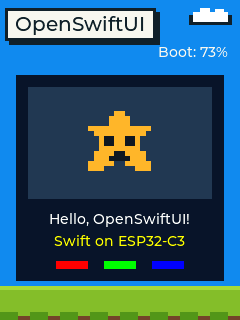
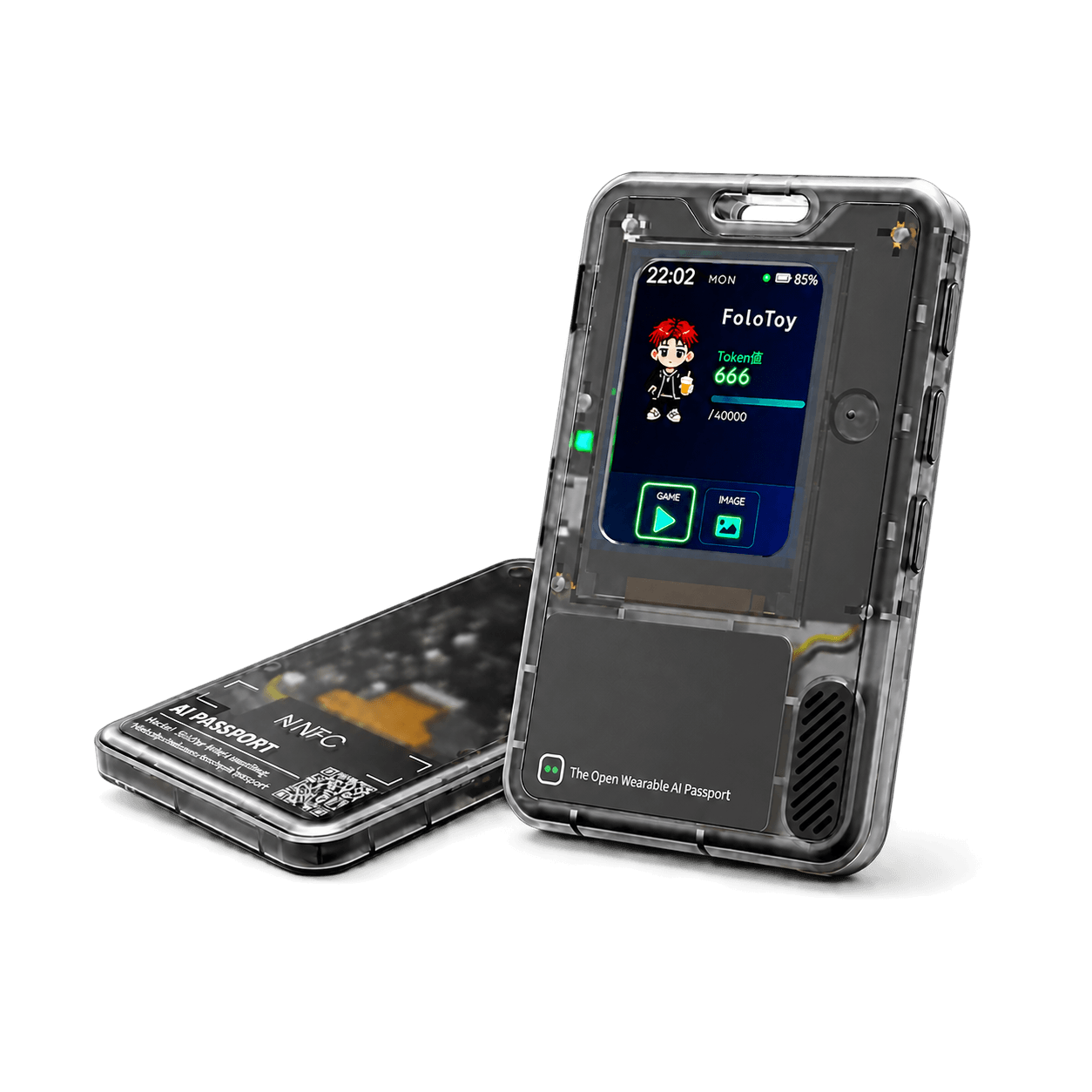
The preview uses the firmware’s LVGL renderer on the host. The firmware has also been built, flashed, and tested on the device, including the UP, DOWN, and OK buttons. The blue sky, title, battery indicator, and grass belong to the firmware’s surrounding scene; ContentView supplies the central panel.
A familiar View on a smaller machine
This is a deliberately small source profile. It preserves View, @ViewBuilder, generic body composition, and a useful set of primitives: Color, Text, Image, VStack, HStack, and ZStack, together with modifiers such as frame, padding, and background.
Here is a smaller example using the same APIs as the demo. The spark image is a named asset supplied by the board application. Pressing OK changes the panel color.
import OpenSwiftUI

struct ContentView: View {
    @State private var blue = false

    var body: some View {
        VStack(spacing: 12) {
            Image("spark")
                .resizable()
                .frame(width: 80, height: 80)

            Text("Hello, OpenSwiftUI!")
            Text("Swift on ESP32-C3")
                .foregroundStyle(.yellow)

            HStack(spacing: 16) {
                Color.red.frame(width: 32, height: 8)
                Color.green.frame(width: 32, height: 8)
                Color.blue.frame(width: 32, height: 8)
            }
        }
        .padding(12)
        .background(blue ? Color.blue : Color.black)
        .onPhyicButton(.ok) { blue.toggle() }
    }
}
The complete demo ContentView adds palette selection with UP and DOWN and toggles the sprite with OK. onPhyicButton is the current experimental API spelling.
Propose, measure, place, draw
The layout starts with RootGeometry. The host provides the physical screen size and any insets reserved for the surrounding scene. OpenSwiftUI proposes the available area to the root view, measures its content, and places the fitted result.
Stacks measure their children before allocating space along their main axis. Text is measured with the platform font, images report their intrinsic size unless made resizable, and padding and frames take part in measurement. The example uses normal stack layout without manual offsets. Custom layouts can use the profile’s Layout protocol and its measurement and placement phases; this API currently uses integer pixels and typed subviews.
Drawing crosses a small boundary. The board application implements EmbeddedRenderSink, whose operations measure text and images and draw fills, text, and images. Its C bridge calls LVGL, the open-source embedded graphics library. LVGL and the ESP-IDF drivers handle the graphics objects and display hardware; OpenSwiftUI handles view composition and layout.
The framework itself owns no framebuffer. This boundary also makes it possible to test layout with recording sinks and render pixel previews through LVGL without connecting the device.
State that survives button presses
An EmbeddedViewHost constructs and retains the root view. Each @State value uses shared storage associated with that host, so copying a view value keeps access to the same state. A state write invalidates the host, and the platform renders again after dispatching the button action.
let geometry = RootGeometry(
    screenSize: .init(width: 240, height: 320)
)
let host = EmbeddedViewHost { ContentView() }
host.render(rootGeometry: geometry, to: &sink)

// The platform forwards a physical click into the current view body.
host.send(.ok)
if host.needsRender {
    host.render(rootGeometry: geometry, to: &sink)
}
Here, sink is the board’s renderer. The builder passed to EmbeddedViewHost associates new state storage with its owner. Input and rendering run synchronously under the platform’s UI serialization. There is no persistent callback table: dispatch traverses the current body, so handlers use current state and conditional content.
This is retained root state. It does not yet provide dynamic identity for stateful children created inside body, $state bindings, observation, or asynchronous scheduling. A state change triggers another layout and drawing pass, without the default platform’s graph and diffing machinery.
Try the branch
The standalone Swift module builds from the OpenSwiftUI checkout with no additional framework repositories. With an Embedded-capable Swift toolchain selected, start with the host tests:
git clone --single-branch --branch embed/folotoy \
  https://github.com/OpenSwiftUIProject/OpenSwiftUI.git
cd OpenSwiftUI
python3 Scripts/build_embedded.py --target host --output ../build/host
Scripts/test_embedded.sh
The validated environment is macOS arm64 with Swift 6.3.1 RELEASE. Cross-compilation additionally uses its riscv32-none-none-eabi Embedded libraries and the ESP-IDF 5.5.3 ESP32-C3 tools. The Embedded README explains toolchain selection and linking the module and static archive into firmware.
The source profile is selected by OPENSWIFTUI_LVGL && hasFeature(Embedded). The custom flag identifies the LVGL integration, while hasFeature(Embedded) checks the compiler’s active language mode. The build helper selects both and compiles an explicit source list.
For the complete application, clone the AI Passport fork’s main branch and follow its README for setup, host previews, firmware validation, and device-specific deployment. Its build integrates the OpenSwiftUI module through the provided ESP-IDF CMake helper.
Where this experiment fits
The current profile covers static view composition, measured layouts, named images, text, and a small input and state loop. Foundation, the full dynamic graph, animations, accessibility, SF Symbols, and asset-catalog decoding are outside its current scope. It is an experimental branch, with a narrower API than OpenSwiftUI’s default package.
The useful result is already tangible: one Swift view declaration can become pixels on a small RISC-V device, and three physical buttons can change the state behind those pixels. That gives us a concrete place to keep developing embedded layout and rendering support.