
OpenSwiftUI Project
How SwiftUI animation works
A visual tour of state, animation sampling, and Core Animation presentation updates, through OpenSwiftUI’s implementation of the iOS 18 animation model.
SwiftUI calculates animation values in the app process. Core Animation still helps put those values on screen. The interesting boundary is who advances the motion, and that boundary is separate from the choice of main or background thread.
In his September 16 post, SwiftUI engineer Kyle Macomber described this as an early architectural decision: keeping animation near event handling supports continuous, interruptible interaction.
Who calculates the next position?
With a conventional CAAnimation, the app submits a description of the motion. The render server can then advance it independently. With the SwiftUI model, the app calculates the intermediate values and submits visual updates. Both paths use the platform’s rendering infrastructure. See Apple’s render-loop explanation.
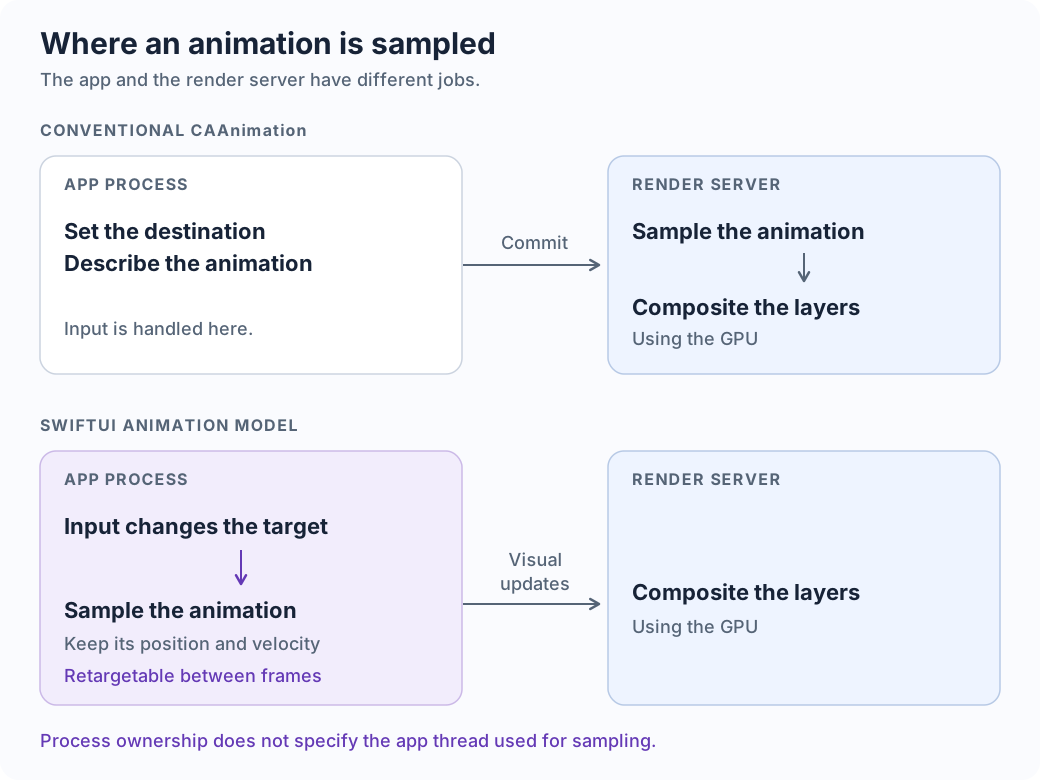
An already-submitted server animation may keep moving while the app is blocked. The app’s event handling still stalls. Conversely, “in the app process” does not mean every sample must run on its main thread.
State supplies a destination
@State private var moved = false

// Inside the view hierarchy:
Circle().offset(x: moved ? 200 : 0)

Button("Change target") {
    withAnimation(.spring(duration: 0.6, bounce: 0.2)) {
        moved.toggle()
    }
}
moved changes immediately. The graph’s model offset becomes 200; a separate presentation value moves toward it. The closure runs once per tap.
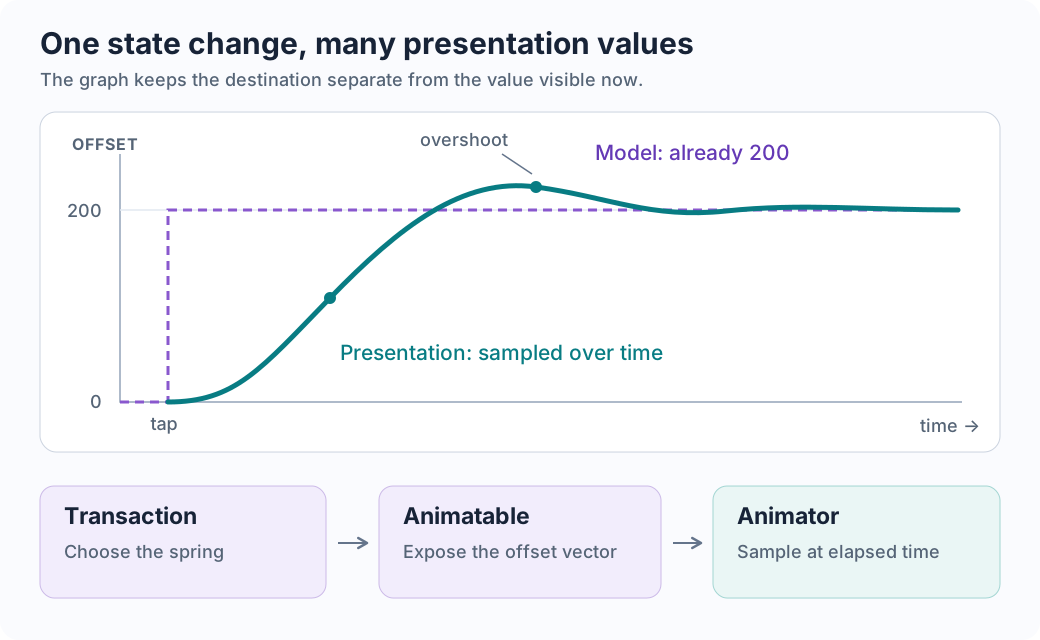
withAnimation installs an animation in a Transaction; state writes carry that transaction into the graph. .animation(_:value:) can replace the animation for a subtree when its watched value changes. Other animatable properties changing in that update can receive it too.
Animatable exposes the numbers to animate as VectorArithmetic data. Animation samples a displacement over elapsed time. For one uninterrupted movement, AnimatorState.update effectively computes:
delta        = target - previousModel
sample       = animation(delta, elapsedTime)
presentation = target + sample - delta
For 0 → 200, a sample of 80 produces presentation 80. A sample of 207 produces an overshoot. The animatable attribute retains the animator between graph updates.
Each frame samples the animation inside the app
The display-link callback advances the host’s time. The renderer host updates graph outputs, active animators sample that time, and a display list describes the result. Unfinished animations request another update.
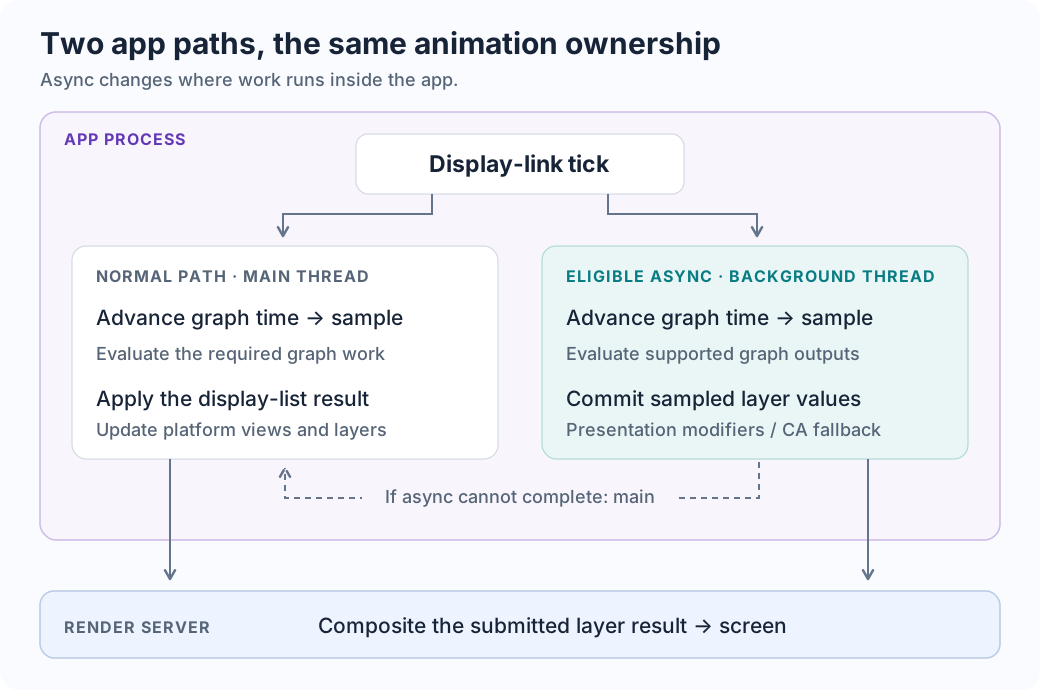
The async path is conditional. Pending transactions or host changes can prevent it; the graph must support asynchronous evaluation, and the display-list update must preserve compatible identities and structure. Otherwise, work returns to the main thread. Apple also describes off-main-thread updates for built-in animatable attributes in WWDC23.
A two-second animation does not precompute 120 display lists. Each eligible update samples the current time. A custom animatable body can require more graph and layout work than a built-in effect.
What commitAsyncValues actually submits
Follow one opacity update: updateStateAsync passes the new display-list opacity to AsyncLayer. It boxes the value and queues a record through setAsyncValue:
layer identity + keyPath "opacity" + sampled value 0.58 + submission mode
The queued value is already this update’s result. It contains neither a spring description nor a timeline to generate future samples. commitAsyncValues groups these records by layer, recovers the cached layer from its identity, and applies each property:
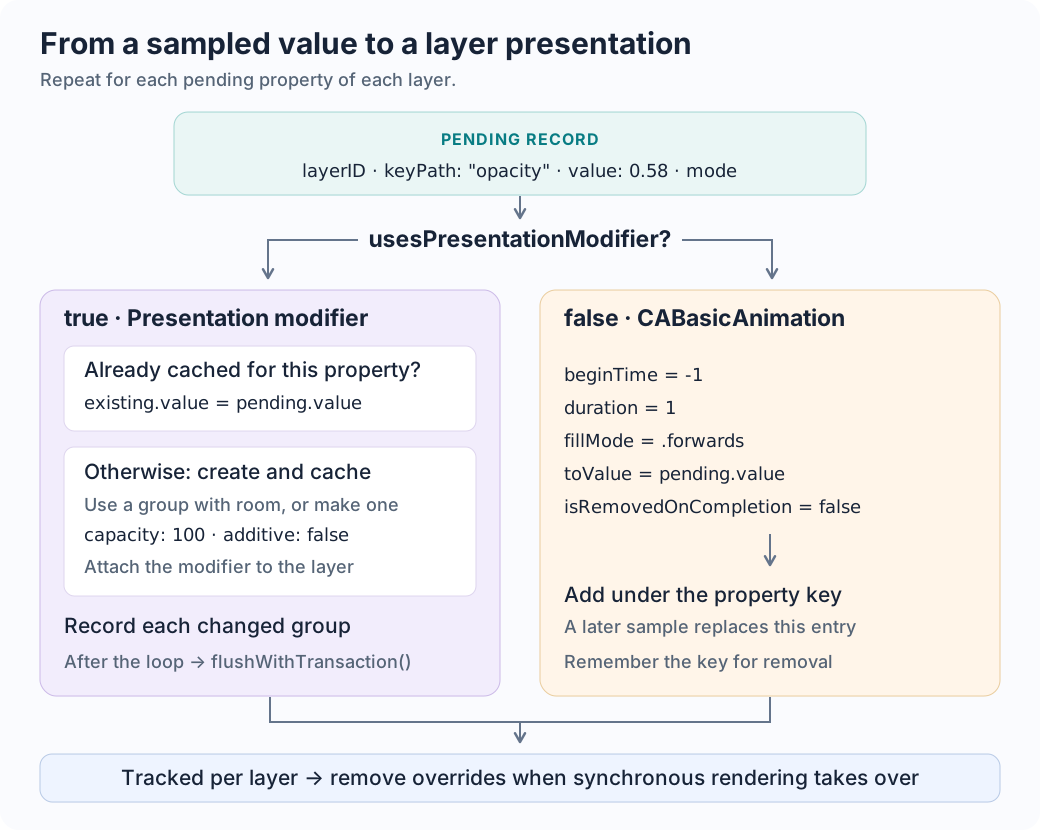
The modifier path has three important details:
- Reuse: the cache is indexed by layer and key path. Later updates assign
existing.value; they do not create a new modifier each frame. - Batching: new modifiers share a group while it has capacity.
100is a modifier count. Changed groups enter a set and are each flushed once after the loop. - Direct values:
additive: falsesupplies the property value directly.updatesAsynchronously = falseconfigures the CA group; the surrounding code explicitly callsflushWithTransaction(). This flag does not select the app’s execution thread.
The method activates a background CA context when called off-main and suppresses implicit actions during the updates. Later, the synchronous renderer calls clearAsyncValues to remove the tracked overrides before applying its result. These private CA interfaces are implementation details, not APIs for application code.
In this pinned source, AsyncLayer.Property.supportsPresentationModifier defaults to true, and its property conformances do not override it. The CABasicAnimation branch exists, but these callers select the modifier path. Source inspection alone does not establish every path Apple’s SwiftUI uses at runtime.
Why is there a CABasicAnimation in the other branch?
Its timing configuration explains its role:
animation.beginTime = -1
animation.duration = 1
animation.fillMode = .forwards
animation.toValue = pending.value
animation.isRemovedOnCompletion = false
layer.add(animation, forKey: pending.keyPath)
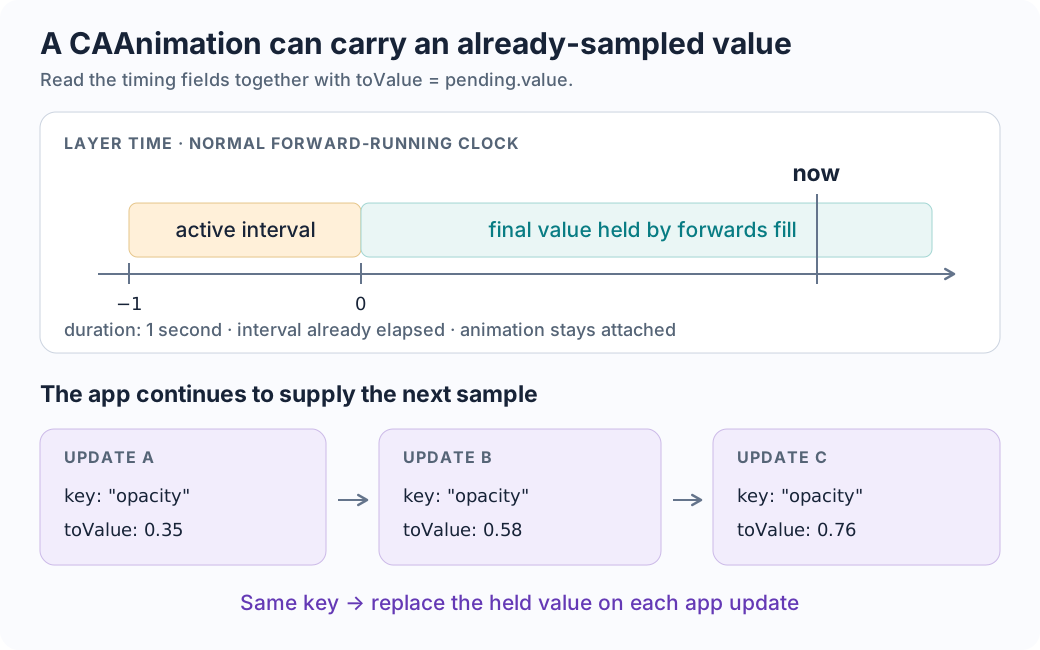
beginTime is relative to the parent’s time. Under a normal forward-running layer clock, the interval from −1 to 0 has already elapsed. Forward fill retains the final appearance, and isRemovedOnCompletion = false keeps the animation attached. This makes the configuration act as a presentation override for pending.value.
On the next app update, add(_:forKey:) replaces the animation under that same key with the new sample. duration = 1 therefore does not mean “animate toward this sample for the next second.” This code does not hand CA the SwiftUI spring to keep evolving independently. The interpretation follows the source and CA timing semantics; a specially paused or retimed layer requires considering its local clock.
New input can change motion already in progress
When a new target arrives, AnimatorState.combine asks whether the animation should merge with its predecessor. The persistent spring implementation can inherit the current displacement and velocity.
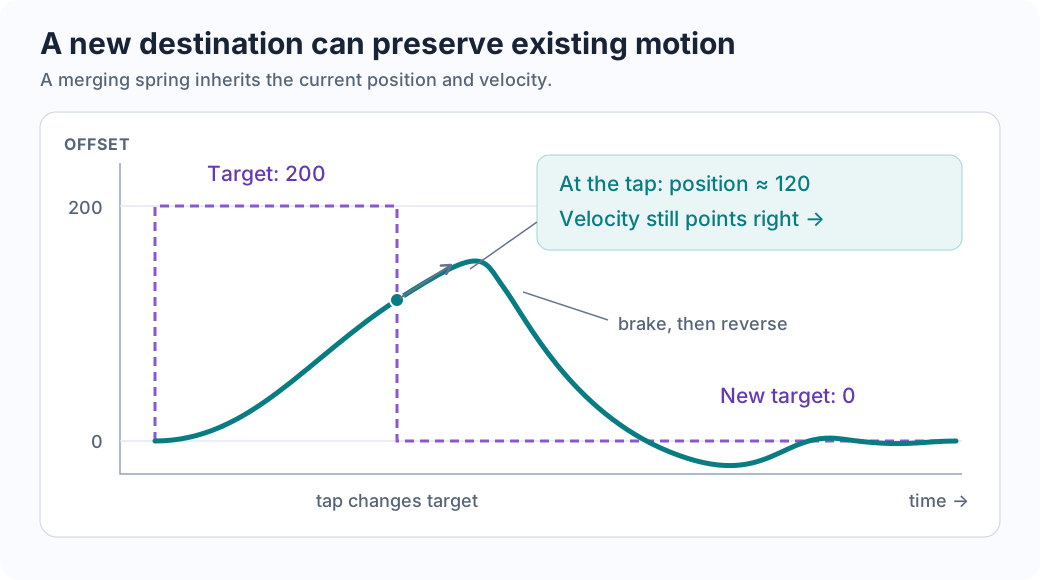
If an animation does not merge, OpenSwiftUI uses a combining animation to retain and combine contributions. Retargeting behavior belongs to the animation implementation. Sharing the app’s update system lets new input reach the state that knows the current motion.
UIKit can use this model too
On iOS 18, importing SwiftUI exposes the UIView.animate overload that accepts a SwiftUI animation:
UIView.animate(.spring(duration: 0.6, bounce: 0.2)) {
    view.center = destination
}
AppKit provides NSAnimationContext.animate. Apple’s guide and WWDC24 session describe this model updating layer presentation values; representables can use context.animate to carry the SwiftUI transaction into platform-view updates.
When diagnosing a hitch, trace input → graph → animation sample → layer update → compositing. Both the app and render server have deadlines. A visible CA object, or the word “async,” alone does not identify who owns the animation’s clock.